Blended Representative Periods with Tulipa Clustering
Introduction
Using representative periods is a simplification method to reduce the size of the problem. Instead of solving for every time period, the model solves for a few chosen representatives of the data. The original data is then reconstructed or approximated by blending the representatives.
Tulipa uses the package TulipaClustering.jl to choose representatives and cluster input data.
Set up the environment
Add the new packages:
using Pkg: Pkg
Pkg.activate(".")
Pkg.add("TulipaClustering")
Pkg.add("Distances")
Import packages:
import TulipaIO as TIO
import TulipaEnergyModel as TEM
import TulipaClustering as TC
using DuckDB
using DataFrames
using Plots
using Distances
Question: Do you remember how to install the two new libraries into your environment?
Set up the workflow
The data for this tutorial can be found in the folder my-awesome-energy-system/tutorial-4
Load the data:
connection = DBInterface.connect(DuckDB.DB)
input_dir = joinpath(@__DIR__, "my-awesome-energy-system/tutorial-4")
TIO.read_csv_folder(connection, input_dir)DuckDB.DB(":memory:")Remember that you can always define and create the output directory if it doesn't exist to export the results to csv files. Then you can use the output_folder keyword argument in the run_scenario function to save the results in that folder.
Try to run the problem as usual:
TEM.populate_with_defaults!(connection)
energy_problem = TEM.run_scenario(connection)
Uh oh! It doesn't work. Why not?
ERROR: DataValidationException: The following issues were found in the data:
- Column 'milestone_year' of table 'rep_periods_data' does not have a default
In previous tutorials, the representative periods tables were available in the input directories asumming you had only one representative period for the whole year, e.g., have a look at the tables profiles_rep_periods, rep_periods_data, rep_periods_mapping, and timeframe_data in tutorials 1 to 3.
Now, we will learn how to generate these tables using TulipaClustering! 😉
Using TulipaClustering
Explore the Profiles Data
Let's first take a look at the profiles data we have by looking at the file profiles-wide.csv in the input directory. You can also use TulipaIO to read the table and see its contents by displaying the first 12 rows of the table:
profiles_wide_df = TIO.get_table(connection, "profiles_wide")
first(profiles_wide_df, 12)| Row | milestone_year | timestep | availability-wind | availability-solar | demand-demand |
|---|---|---|---|---|---|
| Int64 | Int64 | Float64 | Float64 | Float64 | |
| 1 | 2030 | 1 | 0.975744 | 0.0 | 0.633142 |
| 2 | 2030 | 2 | 0.974482 | 0.0 | 0.625239 |
| 3 | 2030 | 3 | 0.974812 | 0.0 | 0.62111 |
| 4 | 2030 | 4 | 0.97763 | 0.0 | 0.619755 |
| 5 | 2030 | 5 | 0.976298 | 0.0 | 0.620001 |
| 6 | 2030 | 6 | 0.976918 | 0.0 | 0.627268 |
| 7 | 2030 | 7 | 0.976979 | 0.0 | 0.667478 |
| 8 | 2030 | 8 | 0.972972 | 0.0 | 0.696503 |
| 9 | 2030 | 9 | 0.973027 | 0.0 | 0.711401 |
| 10 | 2030 | 10 | 0.976669 | 0.0 | 0.729661 |
| 11 | 2030 | 11 | 0.977241 | 0.0975999 | 0.736751 |
| 12 | 2030 | 12 | 0.978 | 0.164052 | 0.739043 |
The wide is very convenient for humans to read, but not so much for computers to process. We need to transform it into a long format first.
Transforming the Format from Wide to Long
TulipaClustering provides a function transform_wide_to_long! that does exactly that:
TC.transform_wide_to_long!(
    connection,
    "profiles_wide",
    "profiles";
    exclude_columns = ["milestone_year", "timestep"]
)
Let's have a look at the new table at the first 5 rows and the last 5 rows:
profiles_df = TIO.get_table(connection, "profiles")
first(profiles_df, 5)| Row | milestone_year | timestep | profile_name | value |
|---|---|---|---|---|
| Int64 | Int64 | String | Float64 | |
| 1 | 2030 | 1 | availability-solar | 0.0 |
| 2 | 2030 | 2 | availability-solar | 0.0 |
| 3 | 2030 | 3 | availability-solar | 0.0 |
| 4 | 2030 | 4 | availability-solar | 0.0 |
| 5 | 2030 | 5 | availability-solar | 0.0 |
last(profiles_df, 5)| Row | milestone_year | timestep | profile_name | value |
|---|---|---|---|---|
| Int64 | Int64 | String | Float64 | |
| 1 | 2030 | 8756 | demand-demand | 0.916969 |
| 2 | 2030 | 8757 | demand-demand | 0.879445 |
| 3 | 2030 | 8758 | demand-demand | 0.840501 |
| 4 | 2030 | 8759 | demand-demand | 0.805736 |
| 5 | 2030 | 8760 | demand-demand | 0.774246 |
The new table stacks the columns with profile data into one column called value and adds a new column called profile_name that contains the names of the profiles. Each row now corresponds to one timestep of one profile per year.
Clustering the Profiles
We can perform the clustering by using the cluster! function from TulipaClustering by passing the connection with the profiles table and two extra arguments:
period_duration: How long are the periods (e.g., 24 for daily periods if the timestep is hourly);num_rps: How many representative periods.
Let's first use the function cluster! with its default parameters. Have a look at the default definition if you're curious.
period_duration = 24
num_rps = 4
# A layout is required for the clustering to know which name is used for year
layout = TC.ProfilesTableLayout(year = :milestone_year)
clusters = TC.cluster!(connection, period_duration, num_rps; layout = layout)
Dict{DataFrames.GroupKey{DataFrames.GroupedDataFrame{DataFrames.DataFrame}}, TulipaClustering.ClusteringResult} with 1 entry:
GroupKey: (milestone_year = 2030,) => ClusteringResult(288×5 DataFrame…Explore the results by looking at the new tables created, e.g., profiles_rep_periods, rep_periods_data, rep_periods_mapping, and timeframe_data. Remember that you can use TIO.get_table(connection, "table_name") to explore the tables.
Now, let's have a look at the clustering results by plotting the representative periods:
df = TIO.get_table(connection, "profiles_rep_periods")
rep_periods = unique(df.rep_period)
plots = []

for rp in rep_periods
    df_rp = filter(row -> row.rep_period == rp, df)
    p = plot(size=(400, 300), title="Representative Period $rp")

    for group in groupby(df_rp, :profile_name)
        name = group.profile_name[1]
        plot!(p, group.timestep, group.value, label=name)
    end

    show_legend = (rp == rep_periods[1])
    plot!(p,
          xlabel="Timestep",
          ylabel="Value",
          xticks=0:2:period_duration,
          xlim=(1, period_duration),
          ylim=(0, 1),
          legend=show_legend ? :bottomleft : false,
          legendfontsize=6
         )
    push!(plots, p)
end

plot(plots..., layout=(2, 2), size=(800, 600))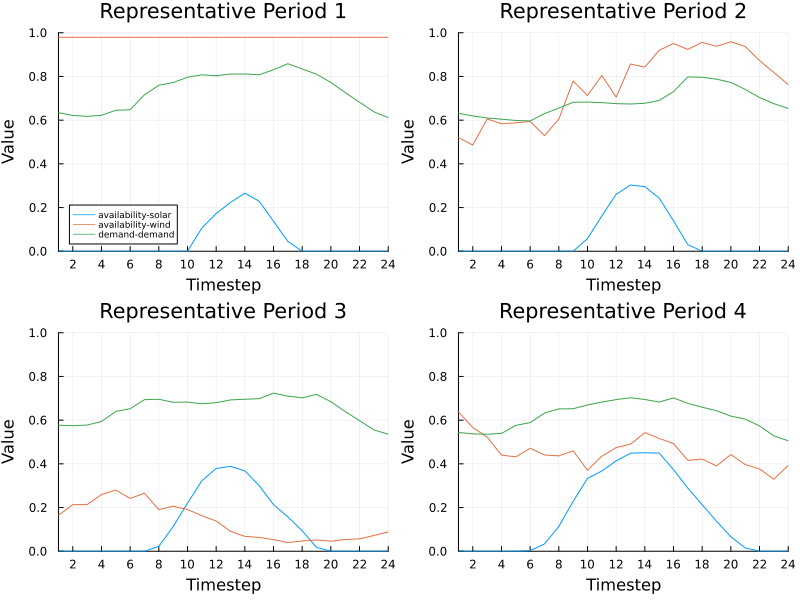
Nice! But, do you know we can do better than this? Yes, we can! Let's explore a more advanced clustering method.
Hull Clustering with Blended Representative Periods
The function cluster! has several keyword arguments that can be used to customize the clustering process. Alternatively, you can use the help mode in Julia REPL by typing ?cluster! to see all the available keyword arguments and their descriptions. Here is a summary of the most important keyword arguments for this example:
method(default:k_medoids): clustering method to use:k_means,:k_medoids,:convex_hull,:convex_hull_with_null, or:conical_hull.distance(defaultDistances.Euclidean()): semimetric used to measure distance between data points from the the package Distances.jl.weight_type(default:dirac): the type of weights to find; possible values are::dirac: each period is represented by exactly one representative period (a one unit weight and the rest are zeros):convex: each period is represented as a convex sum of the representative periods (a sum with nonnegative weights adding into one):conical: each period is represented as a conical sum of the representative periods (a sum with nonnegative weights):conical_bounded: each period is represented as a conical sum of the representative periods (a sum with nonnegative weights) with the total weight bounded from above by one.
As you can see, there are several keyword arguments that can be combined to explore different clustering strategies. Our proposed method is the Hull Clustering with Blended Representative Periods, see the references in the TulipaClustering package. To activate this method you need to set up the following keyword arguments:
method = :convex_hulldistance = Distances.CosineDist()weight_type = :convex
So, let's cluster again using the proposed method:
using Distances
clusters = TC.cluster!(connection,
                    period_duration,
                    num_rps;
                    method = :convex_hull,
                    distance = Distances.CosineDist(),
                    weight_type = :convex,
                    layout = layout,
                    )

# Let's have a look at the first 10 rows of the new rep_periods_mapping table
first(TIO.get_table(connection, "rep_periods_mapping"), 10)| Row | milestone_year | period | rep_period | weight |
|---|---|---|---|---|
| Int64 | Int64 | Int64 | Float64 | |
| 1 | 2030 | 1 | 1 | 0.0544492 |
| 2 | 2030 | 1 | 2 | 0.945551 |
| 3 | 2030 | 2 | 1 | 0.0330009 |
| 4 | 2030 | 2 | 2 | 0.895124 |
| 5 | 2030 | 2 | 3 | 0.0718754 |
| 6 | 2030 | 3 | 1 | 0.0297423 |
| 7 | 2030 | 3 | 2 | 0.896041 |
| 8 | 2030 | 3 | 3 | 0.0742168 |
| 9 | 2030 | 4 | 2 | 0.0449955 |
| 10 | 2030 | 4 | 3 | 0.176491 |
What do you notice about the new representative periods mapping?
Let's plot again the resulting representative periods, but this time using the clustered profiles with the hull clustering method:
df = TIO.get_table(connection, "profiles_rep_periods")
rep_periods = unique(df.rep_period)
plots = []

for rp in rep_periods
    df_rp = filter(row -> row.rep_period == rp, df)
    p = plot(size=(400, 300), title="Hull Clustering RP $rp")

    for group in groupby(df_rp, :profile_name)
        name = group.profile_name[1]
        plot!(p, group.timestep, group.value, label=name)
    end

    show_legend = (rp == rep_periods[1])
    plot!(p,
          xlabel="Timestep",
          ylabel="Value",
          xticks=0:2:period_duration,
          xlim=(1, period_duration),
          ylim=(0, 1),
          legend=show_legend ? :topleft : false,
          legendfontsize=6
         )
    push!(plots, p)
end

plot(plots..., layout=(2, 2), size=(800, 600))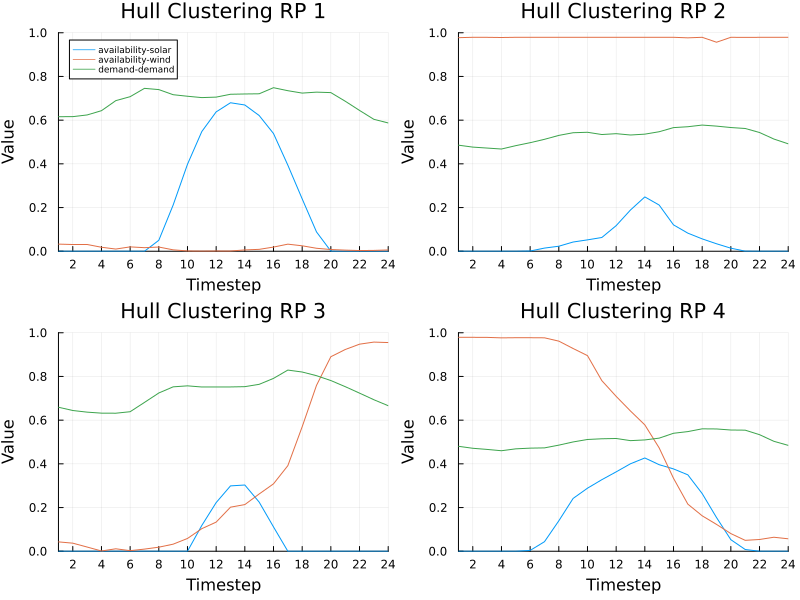
The first difference you may notice is that the representative periods (RPs) obtained with hull clustering are more extreme than those obtained with the default method. This is because hull clustering selects RPs that are more likely to be constraint-binding in an optimization model.
The parameters niters and learning_rate tell for how many iterations to run the descent and by how much to adjust the weights in each iterations. More iterations make the method slower but produce better results. Larger learning rate makes the method converge faster but in a less stable manner (i.e., weights might start going up and down a lot from iteration to iteration). Sometimes you need to find the right balance for yourself. In general, if the weights produced by the method look strange, try decreasing the learning rate and/or increasing the number of iterations.
Running the Model
To run the model, add the data to the system with TulipaIO and then run it as usual:
TEM.populate_with_defaults!(connection)
energy_problem = TEM.run_scenario(connection);
EnergyProblem:
- Model created!
- Number of variables: 1056
- Number of constraints for variable bounds: 960
- Number of structural constraints: 1344
- Model solved!
- Termination status: OPTIMAL
- Objective value: 1.614212305171903e8
- Objective breakdown:
- assets_fixed_cost_aggregated_vintage_method: 0.0
- assets_fixed_cost_compact_vintage_method: 0.0
- assets_investment_cost: 0.0
- flows_fixed_cost: 0.0
- flows_investment_cost: 0.0
- flows_operational_cost: 1.614212305171903e8
- storage_assets_energy_fixed_cost: 0.0
- storage_assets_energy_investment_cost: 0.0
- units_on_operational_cost: 0.0
- vintage_flows_operational_cost: 0.0
Interpreting the Results
To plot the results, first read the data with TulipaIO and filter what's needed (and rename time_block_start to timestep while you're at it):
flows = TIO.get_table(connection, "var_flow")

select!(
    flows,
    :from_asset,
    :to_asset,
    :milestone_year,
    :rep_period,
    :time_block_start => :timestep,
    :solution
)

from_asset = "ccgt"
to_asset = "e_demand"
year = 2030

filtered_flow = filter(
    row ->
        row.from_asset == from_asset &&
            row.to_asset == to_asset &&
            row.milestone_year == year,
    flows,
)
# display the first 10 rows of the filtered flow
first(filtered_flow, 10)| Row | from_asset | to_asset | milestone_year | rep_period | timestep | solution |
|---|---|---|---|---|---|---|
| String | String | Int32 | Int32 | Int32 | Float64 | |
| 1 | ccgt | e_demand | 2030 | 1 | 1 | 615.851 |
| 2 | ccgt | e_demand | 2030 | 1 | 2 | 616.034 |
| 3 | ccgt | e_demand | 2030 | 1 | 3 | 623.815 |
| 4 | ccgt | e_demand | 2030 | 1 | 4 | 643.319 |
| 5 | ccgt | e_demand | 2030 | 1 | 5 | 689.316 |
| 6 | ccgt | e_demand | 2030 | 1 | 6 | 707.398 |
| 7 | ccgt | e_demand | 2030 | 1 | 7 | 745.526 |
| 8 | ccgt | e_demand | 2030 | 1 | 8 | 714.807 |
| 9 | ccgt | e_demand | 2030 | 1 | 9 | 610.763 |
| 10 | ccgt | e_demand | 2030 | 1 | 10 | 510.414 |
To reinterpret the RP data as base periods data, first create a new dataframe that contains both by using the inner join operation:
rep_periods_mapping = TIO.get_table(connection, "rep_periods_mapping")
df = innerjoin(filtered_flow, rep_periods_mapping, on=[:milestone_year, :rep_period])
# display the first 10 rows of the new dataframe
first(df, 10)| Row | from_asset | to_asset | milestone_year | rep_period | timestep | solution | period | weight | scenario |
|---|---|---|---|---|---|---|---|---|---|
| String | String | Int32 | Int32 | Int32 | Float64 | Int32 | Float64 | Int32 | |
| 1 | ccgt | e_demand | 2030 | 1 | 1 | 615.851 | 1 | 0.0544492 | 1 |
| 2 | ccgt | e_demand | 2030 | 1 | 2 | 616.034 | 1 | 0.0544492 | 1 |
| 3 | ccgt | e_demand | 2030 | 1 | 3 | 623.815 | 1 | 0.0544492 | 1 |
| 4 | ccgt | e_demand | 2030 | 1 | 4 | 643.319 | 1 | 0.0544492 | 1 |
| 5 | ccgt | e_demand | 2030 | 1 | 5 | 689.316 | 1 | 0.0544492 | 1 |
| 6 | ccgt | e_demand | 2030 | 1 | 6 | 707.398 | 1 | 0.0544492 | 1 |
| 7 | ccgt | e_demand | 2030 | 1 | 7 | 745.526 | 1 | 0.0544492 | 1 |
| 8 | ccgt | e_demand | 2030 | 1 | 8 | 714.807 | 1 | 0.0544492 | 1 |
| 9 | ccgt | e_demand | 2030 | 1 | 9 | 610.763 | 1 | 0.0544492 | 1 |
| 10 | ccgt | e_demand | 2030 | 1 | 10 | 510.414 | 1 | 0.0544492 | 1 |
Next, use Julia's Split-Apply-Combine approach to group the dataframe into smaller ones. Each grouped dataframe contains a single data point for one base period and all RPs it maps to. Then multiply the results by weights and add them up.
gdf = groupby(df, [:from_asset, :to_asset, :milestone_year, :period, :timestep])
result_df = combine(gdf, [:weight, :solution] => ((w, s) -> sum(w .* s)) => :solution)
# display the first 10 rows of the result dataframe
first(result_df, 10)| Row | from_asset | to_asset | milestone_year | period | timestep | solution |
|---|---|---|---|---|---|---|
| String | String | Int32 | Int32 | Int32 | Float64 | |
| 1 | ccgt | e_demand | 2030 | 1 | 1 | 33.5326 |
| 2 | ccgt | e_demand | 2030 | 1 | 2 | 33.5425 |
| 3 | ccgt | e_demand | 2030 | 1 | 3 | 33.9662 |
| 4 | ccgt | e_demand | 2030 | 1 | 4 | 35.0282 |
| 5 | ccgt | e_demand | 2030 | 1 | 5 | 37.5327 |
| 6 | ccgt | e_demand | 2030 | 1 | 6 | 38.5173 |
| 7 | ccgt | e_demand | 2030 | 1 | 7 | 40.5933 |
| 8 | ccgt | e_demand | 2030 | 1 | 8 | 38.9207 |
| 9 | ccgt | e_demand | 2030 | 1 | 9 | 33.2555 |
| 10 | ccgt | e_demand | 2030 | 1 | 10 | 27.7916 |
Now you can plot the results. Remove the period data since you don't need it anymore, and re-sort the data to make sure it is in the right order.
TC.combine_periods!(result_df)
sort!(result_df, :timestep)

plot(
    result_df.timestep,
    result_df.solution;
    label=string(from_asset, " -> ", to_asset),
    xlabel="Hour",
    ylabel="[MWh]",
    marker=:circle,
    markersize=2,
    xlims=(1, 168),
)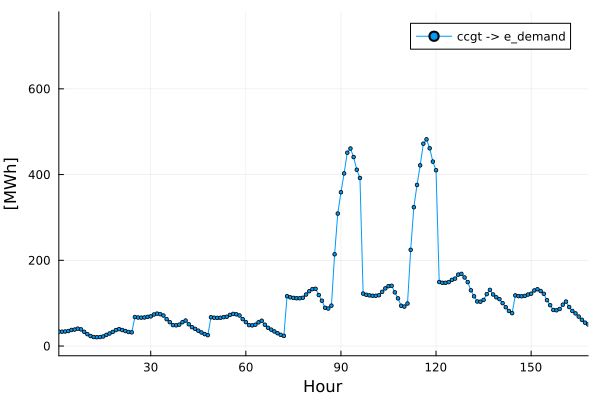
This concludes this tutorial! Play around with different parameters to see how the results change. For example, when you use :dirac vs :convex weights, do you see the difference? How does the solution change as you increase the number of RPs?
Working with the New Tables Created by TulipaClustering
You can check the new tables with TulipaIO, for example, let's have a look at the first 10 rows of the new rep_periods_mapping table:
first(TIO.get_table(connection,"rep_periods_mapping"), 10)| Row | milestone_year | period | rep_period | weight | scenario |
|---|---|---|---|---|---|
| Int32 | Int32 | Int32 | Float64 | Int32 | |
| 1 | 2030 | 1 | 1 | 0.0544492 | 1 |
| 2 | 2030 | 1 | 2 | 0.945551 | 1 |
| 3 | 2030 | 2 | 1 | 0.0330009 | 1 |
| 4 | 2030 | 2 | 2 | 0.895124 | 1 |
| 5 | 2030 | 2 | 3 | 0.0718754 | 1 |
| 6 | 2030 | 3 | 1 | 0.0297423 | 1 |
| 7 | 2030 | 3 | 2 | 0.896041 | 1 |
| 8 | 2030 | 3 | 3 | 0.0742168 | 1 |
| 9 | 2030 | 4 | 2 | 0.0449955 | 1 |
| 10 | 2030 | 4 | 3 | 0.176491 | 1 |
If you want to save the intermediary tables created by the clustering, you can do this with DuckDB:
DuckDB.execute(
    connection,
    "COPY 'profiles_rep_periods' TO 'profiles-rep-periods.csv' (HEADER, DELIMITER ',')",
)
(Count = [288],)Remember, the new tables out from the TulipaClustering are:
profiles_rep_periodsrep_periods_datarep_periods_mappingtimeframe_data
This is useful when you don't have to rerun the clustering every time.